Elevate Your Stationery Designs with the Invitation Suite Smart Object Mock Up
There is a specific moment in the design process where a flat digital file needs to transform into a tangible object. You have spent hours selecting the right serif font for the headers and a complementary script font for the monograms, but presenting these choices on a white background rarely does the work justice. Clients and customers need to see the weight of the paper, the texture of the envelope, and the cohesion of a matching set. This is exactly where the Invitation Suite Smart Object Mock Up becomes an essential asset in your creative toolkit. It is not just a static image; it is a dynamic environment designed to showcase your typography and layout skills with high-end realism.
The Anatomy of a Professional Presentation
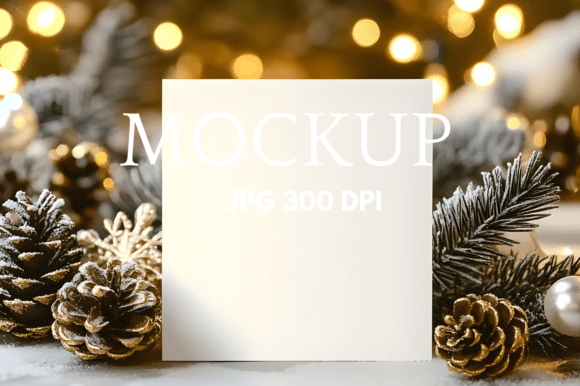
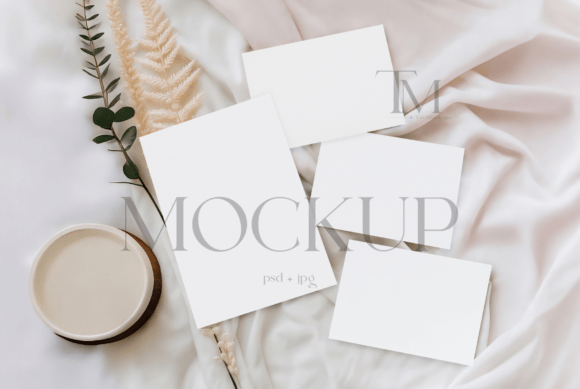
When you open the file, you are greeted with a clean, high-resolution layout that prioritizes your design. The visual style of this mockup is distinctly modern and airy, characterized by soft shadows and a neutral background that allows intricate details to shine. It avoids the clutter of overly styled props, focusing instead on the stationery itself. The personality of the mockup is professional yet approachable, making it suitable for luxury weddings and casual bridal showers alike.
The core of the Invitation Suite Smart Object Mock Up lies in its functionality. The file utilizes Photoshop Smart Objects, which means you do not need to be a 3D rendering expert to achieve realistic results. You simply paste your design into the designated layer, and the software automatically applies the correct perspective, lighting, and texture. This feature is vital for maintaining the integrity of your modern typography. If you have chosen a premium font with delicate serifs or fine hairlines, this mockup ensures those details remain crisp at 300 DPI, rather than becoming muddy or distorted.
Strategic Applications for Designers and Entrepreneurs
For those running an Etsy shop or a stationery business, the difference between a sale and a scroll-past often comes down to the quality of the product photography. However, hiring a photographer for every new font pairing or color palette variation is rarely feasible. This mockup bridges that gap, allowing you to generate studio-quality images instantly.
Consider the workflow of a brand identity designer. You are creating a suite for a high-end client that includes a logo design, business cards, and letterheads. By using this mockup, you can present the logo design in context, showing how the display font interacts with the physical medium. This helps the client visualize the final product, reducing revisions and increasing confidence in your expertise. It turns a theoretical concept into a tangible asset.
Maximizing Visual Hierarchy and Readability
The true test of any creative font is how it performs in the real world. A handwritten font might look charming on screen, but does it lose legibility when printed on textured cardstock? The Invitation Suite Smart Object Mock Up allows you to stress-test your typography choices. You can evaluate how a bold sans serif font balances a delicate script font within a confined space. This visual hierarchy is crucial for editorial design and invitations, where information must be absorbed quickly and elegantly.
Furthermore, consistency is key in packaging design and web design. If you are creating a cohesive look for a bridal shower, you need to ensure the aesthetic flows from the digital invite to the physical thank-you card. This mockup facilitates that consistency. You can use it to create a series of social media graphics that look like a unified campaign rather than disjointed posts.
Practical Guidance for Implementation
Integrating this asset into your workflow requires a strategic approach to maximize its potential. Here are practical steps to ensure you get the most out of your presentation:
- Evaluate Project Fit: Before starting, analyze the personality of your design. This mockup works best for clean, sophisticated layouts. If your project relies on a grunge aesthetic or heavy overlays, you may need to adjust the opacity or blending modes within the PSD file to match the vibe.
- Test Font Pairings: Use the mockup to test contrast. Place a heavy geometric sans serif font against a flowing script font. The realistic lighting of the mockup will reveal if the visual weight is balanced or if one element overpowers the other.
- Review Commercial Licensing: For small business owners, licensing is a practical concern. Ensure your usage aligns with the license terms, particularly if you are selling the mockups as part of a template or using them for large-scale commercial advertising.
- Focus on the Details: Do not just place the main invitation. Utilize the full suite. Add your design to the RSVP card and the envelope. A cohesive presentation demonstrates professionalism and attention to detail, which are key selling points for any commercial font or design service.
Beyond Weddings: Versatility in Branding
While marketed for weddings, the utility of the Invitation Suite Smart Object Mock Up extends far beyond bridal events. It is an excellent tool for presenting corporate stationery. Imagine pitching a rebrand to a law firm or a boutique hotel. Showing their new typeface on high-quality paper stock instantly elevates the perceived value of your work. It signals that you understand not just digital assets, but the tactile experience of a brand.
For bloggers and content creators, this mockup serves as a backdrop for flat lays. It adds depth to social media graphics without distracting from the main subject. It is a versatile design asset that adapts to various contexts, whether you are highlighting a specific font style or promoting a sale in your shop.
Final Thoughts on Quality and Efficiency
In the fast-paced world of design, efficiency is currency. The Invitation Suite Smart Object Mock Up saves you hours of manual rendering and photography. It provides a standardized, high-quality baseline for all your stationery presentations. By utilizing this tool, you ensure that your typography, color choices, and layout are presented in the best possible light, helping you attract the right audience and close more deals. It is a small investment that yields significant returns in professionalism and visual impact.
Thank you for browsing TatiMockups! ⚡️ What you'll receive:
- PSD mockup file with a smart object
- A high-resolution (300 DPI) JPG file.